The meta description is a very important part of your page; in a way, it persuades the user to click on your site. Although it does not improve ranking directly, it can influence CTR by attracting the eyes of users; subsequently, a rise in the CTR can give you better search benefits in the long term. SEO meta description writing is simple and straightforward, but it does require more know-how on search intent, clarity, and how people read search results.
In this guide, I will show you how to craft meta descriptions that lure clicks and complement your SEO strategy.
1. What Is a Meta Description and Why It Matters for SEO
A meta description is the brief text that appears under the title tag in Google search results. It basically explains what the page is about. In addition, it is there to convince users that the particular page should be viewed. Google may rewrite some meta descriptions randomly, but creating good meta descriptions helps the search engines and users understand your content.
Meta descriptions are important because-
- They affect how many people click your page from search results.
- They make your page stand out from the competition.
- They set the expectation before you click.
A meta description that is concise, direct, and phrase specific increases the likelihood that the audience will select your page rather than others.
2. How Meta Descriptions Impact Click Through Rate
User scan results pretty fast while looking for solutions and questions that match their problems. A meta description that exudes value is more likely to draw their attention. The more villagers that click on your result, the more relevance is awarded to your page by Google for that keyword.
CTR does not equate with higher positions in SERPs but just that strong user engagement in any form without illegitimate means can help with your overall SEO. Meta description aligned with your search query lifts the possibility of better search outcomes and reduces bounce by setting clear expectations for the user before they click to view the page.
3. Ideal Meta Description Length and Display Limitations
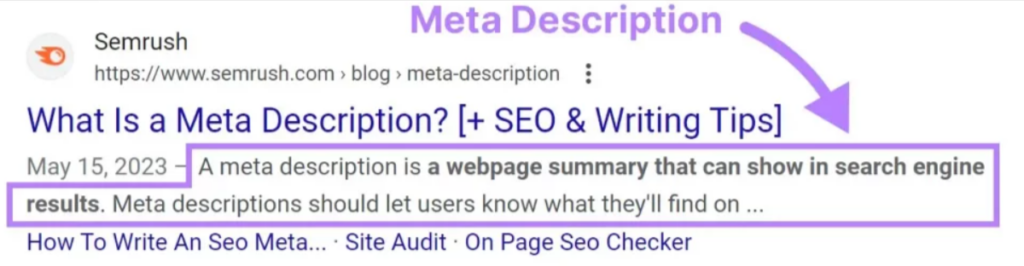
Google shows typically around 150to160 characters, but the width in pixels being the limit, text restrictions bear no concern for the limit. They may, however, look even shorter on mobile. Once the limit is crossed, everything shows up with an ellipsis as though the text runs over the edge.
Best Practices:
- Keep descriptions between 130 and 155 characters.
- Important information should start with the first word.
- First line must put forth the main value or answer.
When descriptions are properly crafted, one can read to understand the overall answer or message without distortion.
4. Understanding Search Intent Before Writing
Search intent shows what the user wants to achieve with a search. If your meta description doesn’t match this intent, it becomes irrelevant, and Google may replace it. Matching intent helps users instantly understand that your page is the right fit.
1. Informational Intent
Users are looking for answers or explanations. A good meta description tells clearly what the page explains and what the reader will learn. The tone should be simple, helpful and focused on clarity.
2. Transactional Intent
Users want to buy something or complete an action. The description should highlight key benefits, main features, or offers. It should encourage action in a natural way and help users decide quickly.
3. Commercial Intent
Users are comparing options before making a purchase. A strong meta description briefly mentions advantages, unique points, or trust factors like ratings or guarantees. The goal is to show why your page is worth checking during their research.
4. Navigational Intent
Users want a specific brand, website, or page. The description should include the brand name clearly and confirm that the user will reach the exact page they are searching for. Keep it straightforward and focused.
5. Key Components of an SEO Friendly Meta Description
Primary Keyword Placement
Use your main keyword naturally. This helps users recognize relevance and may bold the keyword in SERPs. Avoid forcing keywords or repeating them, as this often triggers Google to rewrite your description.
Clear Value Proposition
Users click when they see value. State what your page offers: a solution, guide, review, comparison, or benefit. Avoid vague lines like “Learn more here.” Be specific about what the user will gain.
Benefit Focused and Action Oriented Language
In aid of user prompt and desire, use guiding words like “learn,” “discover,” “compare,” “find,” and “explore.” This encourages them to make the move forward. A strong but simple CTA at the end can improve engagement.
Addressing User Pain Points or Questions
If your content solves a problem, include that directly. When users see their pain point addressed, they trust your page more. This approach is effective for both blog posts and service pages.
Maintaining Accuracy and Avoiding Clickbait
Your description must reflect the real content. Deceiving or inflated lines attract the highest levels of bounce rates. Google also rewrites descriptions when they appear inaccurate or not related to the site.
6. Techniques to Prevent Google From Rewriting Meta Descriptions
Google does normally rewrite meta descriptions whenever they feel too generic, unrelated to the content, or misaligned with the user’s search intent. And to stop this rewriting, you should ensure that the user’s search intent closely reflects what the page genuinely offers.
Align the meta description with your H1 and first paragraph.
Google checks whether the description matches the opening content. When your H1, intro paragraph, and meta description share the same theme and messaging, Google is more likely to keep it as is.
Use wording that reflects the page’s main topic.
Incorporate user friendly in topic wording for live to match keyword compositions. When the wording precisely reflects what the users will find on the page, Google considers this to be great in previews.
Keep it clear, specific, and relevant.
Meta descriptions are better when they tell the users what to expect from the page, with usually higher retention rates. Avoid general phrases such as “Click here” and focus on the gains or interests of the page.
Avoid keyword stuffing or filler summaries.
Overloaded descriptions feel unnatural and reduce trust. Google typically rewrites them because they don’t represent real content. A concise, natural description performs better and reduces the chance of modification.
When the description accurately represents the page, Google is more likely to keep it.
How to write an SEO friendly meta description
Follow these steps every time you write a meta description.
1. Confirm the search intent
Decide if the page is informational, transactional, commercial, or navigational.
Write for that intent — answers for informational pages, benefits and CTAs for transactional pages.
2. Choose a single primary keyword or phrase
Pick the most relevant keyword for the page. Use it naturally once near the start if possible. Don’t stuff multiple keywords.
3. Write one clear value sentence (20–35 words)
Say what the user gets in plain terms. Focus on the main benefit or result the page delivers.
- Example (informational): Step by step SEO guide to spur organic traffic and smoothen out ranking issues.
- Example (product): “Lightweight running shoes that improve comfort and reduce foot fatigue for daily training.”
4. Add a short supporting detail (optional, 8–15 words)
Give one quick reason to click: unique feature, proof, or speed of result.
- “Free templates included.” / “Ships in 24 hours.” / “Reviewed by experts.”
5. Finish with a simple CTA (2–6 words)
Tell the user what to do next: “Read now,” “Buy today,” “Compare models,” “Get a quote.”
6. Keep length within visibility limits
Aim for 130–155 characters (or ~15–25 words). Put the most important info at the start so mobile truncation doesn’t remove it.
7. Match page content
Make sure meta description corresponds to the H1 and first paragraph of the page. If Google discovers these two correctly match, it deems less likely to rewrite your description.
8. Use clear, active verbs
Use direct verbs: “Learn,” “Find,” “Get,” “Shop,” “Compare.” Avoid vague words like “useful” or “interesting.”
FAQs
What is an SEO-friendly meta description?
An SEO friendly meta description is a summary of a web page which has to give the reader an assertion of that page offers. This provides numerous other keywords that would synchronize with the contents of that page.
How long should a meta description be?
The most effective meta descriptions are 120 to 155 characters They collectively summarize the page without cutting off the call to action to the user on SERPs without any paraphrase.
Do meta descriptions affect rankings?
The meta description doesn’t affect your ranking. Instead, they influence CTR. Models with higher CTR show Google that your page is useful. As such, indirectly, this is one minor factor that helps your page become more visible.
Why does Google rewrite meta descriptions?
Google generally rewrites the meta description if the existing one is too generic, keyword-stuffed, irrelevant to the content of the page, or does not align with the user’s search intent.
Should every page have a unique meta description?
Yes, Duplicate descriptions confuse users and search engines. Every page should have a description specific to its theme and purpose.
Can I include keywords in a meta description?
Yes, but only in a natural way. The keywords launched in the description settle usefully the problem of identification for the user, but plonking them around makes both Google substitute for it and downgrades the quality.
Conclusion
Meta descriptions may be small in size, but that is a big piece of great click through opportunity. Writing them with intent, clarity, and value encourages user engagement and SEO value simultaneously. Even with the emergence of algorithmic rehashing by Google in some sectors, soundly established summaries make sure that search engines appreciate the content of your page and users have a pretext to access it while serving well even via simple and practical strategies that spin out smoothly and efficiently from that clarity.